

You think AI knows you. It sort of does.
Tools like ChatGPT and Claude do build up some memory of you over time. ChatGPT has a memory feature. Claude does too. So it might feel like they "know" you.
But it's not perfect, and you don't control what sticks. The AI might remember your name but forget your brand colors. It might recall something from two weeks ago but miss the conversation you had yesterday. You don't always know what it knows. That's the problem.
When you're writing a parent email or putting together marketing materials, you need the AI to know specific things: your school's voice, your brand guide, how you talk to families. You can't just hope it picked that up from a past conversation.
That's why you want to be intentional about it. You want to be able to say: "When you're answering my questions, I want you to reference these specific documents so you understand who I am."
Give the AI your context
Here's what that looks like in practice.
When you open ChatGPT or Claude and type a request like "write me a parent email about our summer camp," the AI has an incomplete picture of who you are. It might have forgotten your school's name, your tone, your brand colors, how you typically communicate with families. It's guessing. And that means you spend a lot of time going back and forth, correcting things that wouldn't have been wrong if it had just known you from the start.
We were talking to someone recently who used AI to design a new logo. They got there eventually. It looked great, but it took a lot of rounds. A lot of "no, not that color" and "that's not our style." The AI wasn't doing anything wrong. It just didn't have the information it needed.
The AI is only as good as the context you give it. And the good news is, there's a really simple way to give it that context.
What are Projects in ChatGPT and Claude?
Both ChatGPT and Claude have a feature called Projects. Think of a project as a workspace where the AI already knows your information before you start a conversation.
You create a project, upload your information (your brand guide, some examples of emails you've sent, your program catalog, whatever is relevant). Every conversation you have inside that project starts with all of that information already loaded.
Instead of explaining who you are every time, the AI already knows:
- Your school's name and brand
- Your colors, fonts, and logo
- How you talk to families
- What programs you run
- Your policies and procedures
It's the difference between hiring someone brand new every day versus working with a team member who already knows how things work.
How to set up an AI project for your school
In ChatGPT
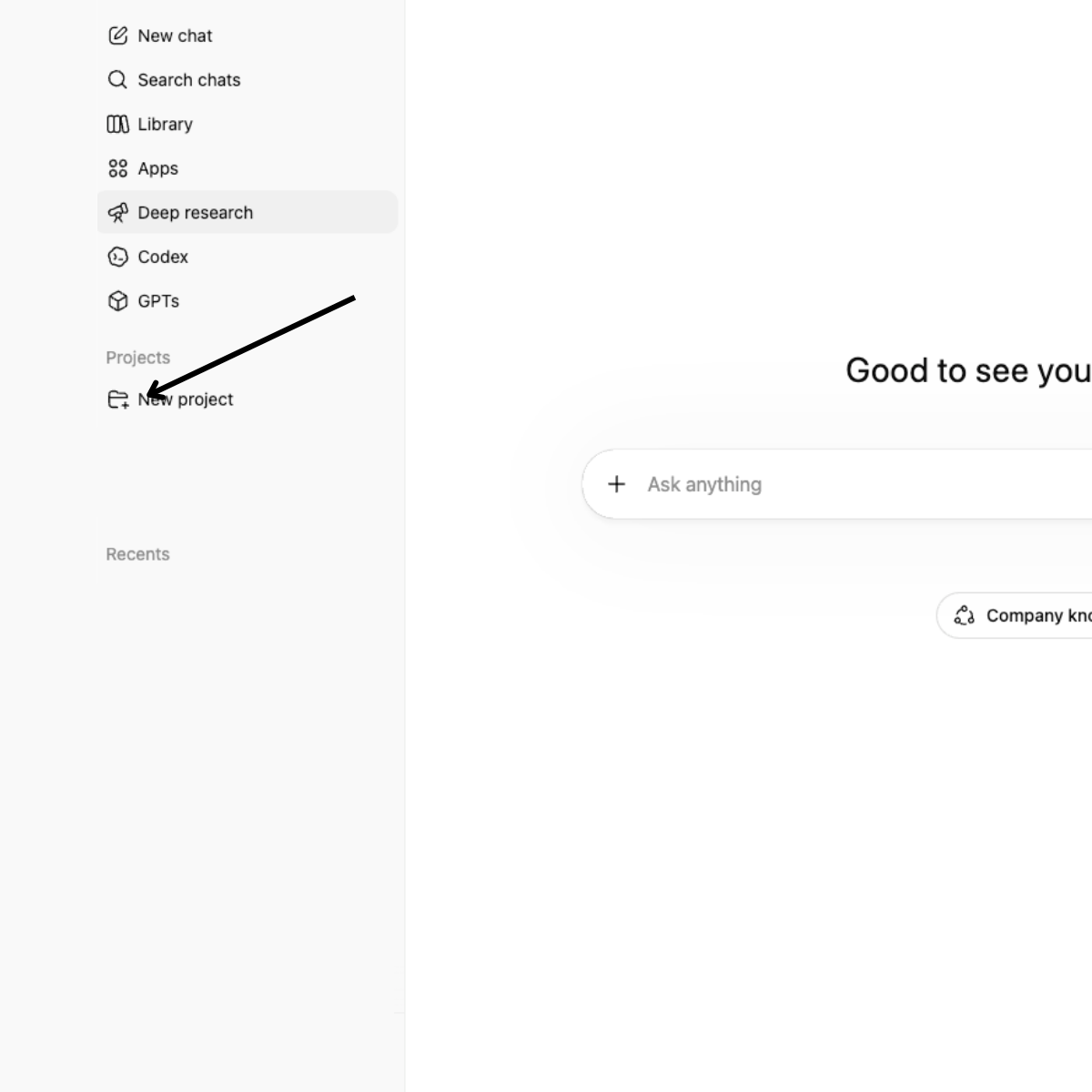
- On the left sidebar, click Projects
- Give it a name (e.g., "Summer Camp Marketing" or "Parent Communications")
- Click Add sources and upload your brand guide, logo, any example documents. In ChatGPT, these are called "sources" because they're the reference material you want the AI to pull from
- Start a new conversation inside that project, and the AI will have all your context from the start
In Claude
- On the left sidebar, click Projects
- Create a new project and give it a name
- Upload your files
- Add any custom instructions (see example below)
- Start chatting. Claude will reference your uploaded files automatically
That's it. Five minutes of setup, and every conversation from here is better.
What's the difference between instructions and files?
Claude Projects have two parts, and they do different things.
Instructions tell the AI how to work with you. This is where you describe your voice, your role, your preferences. Think of it as the conversation you'd have with a new team member on their first day: "Here's who we are, here's how we talk to families, here's what matters to us."
Files (or "sources" in ChatGPT) are the actual documents you want the AI to reference. Your brand guide, past emails, your program catalog, your enrollment data. This is the binder you hand them after orientation.
Both matter. Instructions without files means the AI knows your voice but doesn't have your specifics. Files without instructions means it has your documents but doesn't know how you want things done. Together, they give the AI a real understanding of who you are.
What do good AI project instructions look like?
This is the part people skip, but it makes a huge difference. Here's an example of what you might write in the instructions field:
You are a communication assistant for [Program Name], an after-school and enrichment program serving families at [School Name]. Our program has a warm, encouraging tone. We speak to families like trusted community members, not customers. We use simple, clear language that's welcoming to families of all backgrounds, including those for whom English may be a second language. We avoid jargon and overly formal phrasing. We're enthusiastic but never over-the-top. Think "caring program coordinator" not "corporate marketing." We capitalize our program name consistently, always refer to kids as "students," and sign off communications with "With gratitude" or "In community."
You're basically introducing yourself to the AI the way you would to a new team member on their first day. Before you even share example documents, instructions like these give the AI a starting sense of your voice. Then the files you upload (your brand guide, past emails, program catalog) reinforce and deepen that understanding.
What files should I upload to an AI project?
If you're not sure where to start, here are the files that make the biggest difference:
For marketing and communications:
- Your brand guide (colors, fonts, logo, tone of voice)
- 2-3 examples of newsletters you've sent that you liked
- Your program catalog or course descriptions
- Any social media posts or website copy you're proud of
For program planning:
- Last season's schedule
- Staff handbook or training materials
- Your policies (refund, cancellation, safety)
For board or leadership work:
- Previous board reports or presentations
- Your strategic plan or annual goals
- Budget summaries
You don't need to upload everything at once. Start with 3-4 files that represent how you communicate and what you're working on right now.
Why AI projects matter for schools specifically
School leaders wear a lot of hats. You're running programs, communicating with families, managing staff, reporting to your board, and planning next season, often all in the same week.
AI can help with a lot of that work. But only if it understands your context. A generic parent email doesn't sound like you. A generic board report doesn't reflect your data. A generic social media post doesn't match your brand.
Projects solve this. They turn a general-purpose tool into something that actually knows your school.
When should I set up an AI project for my school?
If you're getting ready for summer right now (prepping summer communication, updating your website, pulling together marketing materials, writing job postings for seasonal staff), this is the perfect time to set up a project.
Create one, drop in your brand guide and a few examples of communications you like, and try asking it to draft something you'd normally write from scratch. See how it compares.
And it's not just communications. Upload your enrollment data (anonymized, no student names) and ask the AI to help you spot trends. How many first graders signed up this season compared to last? Which programs are filling and which ones have open spots? That kind of analysis used to take hours in a spreadsheet. With the right context loaded, it takes a question.
This is the first in a series
We're going to keep sharing practical ways school leaders can use AI, from simple tips like this to more hands-on guides. Things like using AI to create social media content for your summer programs, preparing board documents, analyzing your enrollment data, and more.
We're all figuring this out. The education space has real constraints, and we want to be thoughtful about what we share. But there's a lot of ground to cover, and we think the schools that start learning now will be way ahead in a year.
More to come.
Homeroom is registration and back-office software for schools and program providers. We spend a lot of time thinking about how AI can help the people who run programs for kids. If you want to talk about any of this, reach out.
Frequently asked questions
Is it safe to use AI for school communications?
Yes, as long as you're not uploading student names or other personally identifiable information. Projects work great for marketing, parent communications, program planning, and content creation. You're uploading your brand guide, your catalog, examples of emails you've written. None of that is sensitive.
Does ChatGPT or Claude remember my school's information?
It remembers some things through its memory feature, but it's not reliable. It might remember your name but forget your brand colors. Projects solve this by giving the AI your specific documents to reference every time.
What's the difference between ChatGPT Projects and Claude Projects?
Both let you upload files and start conversations with your information already loaded. The main difference is that Claude Projects also have an "instructions" field where you can describe your voice, preferences, and how you want the AI to work with you. In ChatGPT, you'd include that kind of guidance as an uploaded document.
Can I use AI to analyze enrollment data without sharing student names?
Absolutely. Export your enrollment data with names removed and upload the anonymized version to a project. You can ask questions like "how many first graders signed up this year versus last?" or "which programs are filling and which have open spots?" and get real answers from your own data.
How long does it take to set up an AI project?
About five minutes. Create a project, upload 3-4 files, add instructions if you're using Claude, and start a conversation. That's it.


